
For education departments and local administrations
Safety and communication across your district’s schools in one system
EduGuard connects schools, teachers and parents: in an emergency, students are counted quickly and parents are notified right away. You can start with a pilot in one or several schools.
- With child and parent consent
- Data is never sold
- Pilots start with one school
Features
What changes in each school
The school works in its own panel, parents and teachers in their own app. Everything below is already available.
Emergency mode
During an earthquake, fire or drill, teachers check off every student on a list. Parents get a message that their child is safe.
Arrival at school
Parents know when their child has arrived at school. This works if the child agrees to share their location.
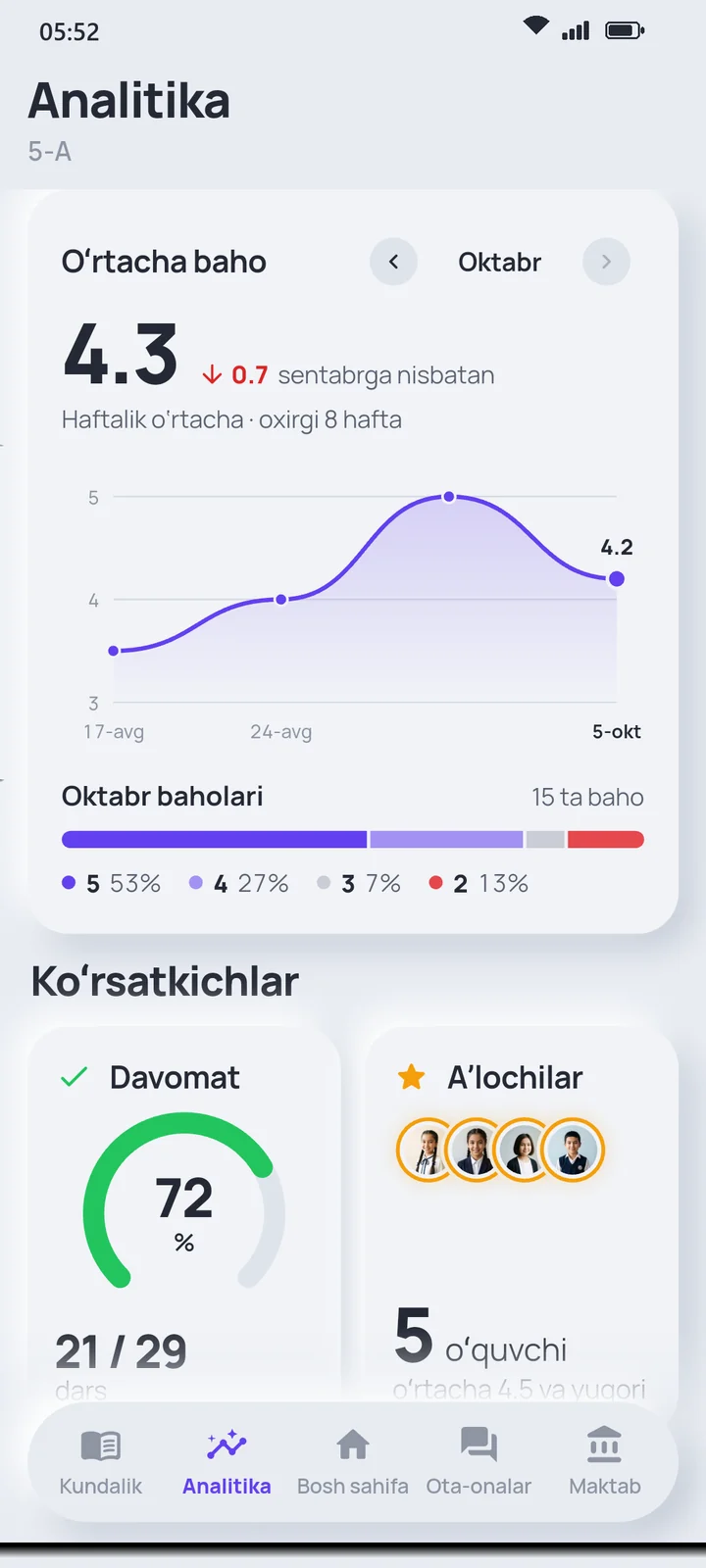
Attendance and grades
Teachers enter attendance and grades on the phone, and parents see them right away.
Concern box
Students can write without giving their name. Only the principal and the school psychologist read it.
Homework load
The principal sees each class’s weekly homework load, which helps spot overload in time.
Reports
Grade and attendance reports export to PDF, Excel or CSV.
Regional monitoring
A separate panel for the authority: attendance, average grade, SOS and drill counts and response time to parents, by school and district. Aggregated, anonymous figures only; Excel or CSV.
No double entry
The school uploads the grades, attendance and timetable file exported from eMaktab — teachers do not spend time re-entering it.
Data protection
Children’s data, handled with extra care
Who sees which data, and where and how long it is kept, is set out openly in the privacy policy.
Child and parent consent
Location, screen time and the SOS camera work only if the student turns them on. The parent gives separate consent for each type of data and can withdraw it.
Role-based access
Each user sees only the data they are allowed to see. The principal cannot see location.
No ads
Data is never sold or shared with third parties.
Encrypted connections
All connections are encrypted, and security checks are run regularly.
Pilot project
How a pilot works
We start small: one or a few schools first, then the next step based on results.
- 01
Meeting
We discuss the district’s needs and choose schools for the pilot.
- 02
Preparation
Schools upload their lists, and teachers and parents connect using cards.
- 03
Trial
Attendance, alerts and an emergency drill are tested in real conditions.
- 04
Results
We review the results together, based on feedback from parents, teachers and school leaders.
Who pays
Premium for parents can be paid by the school, the local administration or a sponsor. Pilot terms are agreed separately.
SOS is never switched off
Even when a subscription ends, the SOS alert and location keep working.
FAQ
Questions from education departments and administrations
Can’t find an answer? Message us on Telegram — a real person will reply.
Can we see several schools in one place?
Yes. Authority staff get a separate “Regional monitoring” panel with aggregated indicators for schools in the region or district: how many students, parents and teachers use EduGuard, attendance, the average grade and its trend, homework load, SOS and drill counts, response time to parents and use of the AI assistant. Schools and districts can be compared, with weekly and monthly trends.
Reports download as Excel or CSV. Sign-in uses a login, a password and a Telegram code; every sign-in and download is logged.
Does the authority see children’s personal data?
No. The panel shows only aggregated, anonymous figures: no names, grades, locations or SOS details. Figures for schools with fewer than 10 students are hidden and excluded from totals, and daily attendance and grades count only when at least 10 students have records that day.
Does it connect to government information systems?
For now, EduGuard is not connected to state information systems. A school can upload the Excel file it exported from eMaktab to the panel — grades, attendance and the timetable are not entered again. Other integrations are discussed separately before a pilot.
How is the child’s consent ensured?
Location, screen time and the SOS camera are switched on in the student’s own app. Neither parents, the school nor we can turn them on remotely.
In addition, when linking a child, the parent gives separate consent for each type of data — location, screen time, SOS photos, health — and can withdraw it at any time. When and how consent was given is recorded.
Where is the data stored?
The database runs on Google Firebase servers in Europe, in Belgium and the Netherlands. Sign-in details and phone numbers are stored in the USA. All connections are encrypted. More: privacy policy.
What if the service goes down?
Services are checked automatically every 5 minutes and their state is shown on a public page. School contracts come with a service level agreement (SLA): a 99.5% monthly uptime target and a response within 30 minutes, day and night, to a critical issue (for example, if an SOS is not delivered).
EduGuard does not replace emergency services: if there is danger, call 112 right away.
What is free for everyone?
The SOS signal and location, the diary, grades, timetable, attendance and ratings are always free for everyone. A subscription unlocks SOS photos and audio, continuous live location, movement alerts and the weekly AI summary.
Let’s talk about a pilot.
We’ll prepare a presentation for your district and answer your questions.
Message us on Telegram